More and more visits come from AI assistants that browse on behalf of a person, for example to compare products or fill a basket. Vision recognises these visits, records them as AI agent sessions and keeps them apart from your human visitors everywhere: figures, quota, patterns and the API.
Three kinds of automated traffic#
| Kind | Examples | What Vision does |
|---|---|---|
| AI agents | ChatGPT Agent, ChatGPT, Claude, Perplexity browsing for a user | Recorded and analysed as sessions, labelled AI agent, with their own friction tags and patterns. Not counted in your quota. |
| AI crawlers | Robots from OpenAI, Anthropic, Google AI, Perplexity, Meta, Apple and others that read pages for search or training | Counted per vendor and per day. Never recorded, never counted in your quota. |
| Other bots | Search engine crawlers, headless browsers, monitoring tools | Not recorded. Counted under Bots in the ignored figures. |
How agents are recognised#
- Declared agents. Some vendors publish how their agent identifies itself. Vision recognises ChatGPT Agent, ChatGPT, Claude and Perplexity from these published signatures.
- Behaviour. Vision also looks for signs of automation in the browser and in how the visit unfolds, and classifies the session when it closes.
The agent's name is shown as Agent · ChatGPT Agent (declared). "Declared" means the agent announced that name: Vision has not verified it cryptographically.
See agent sessions#
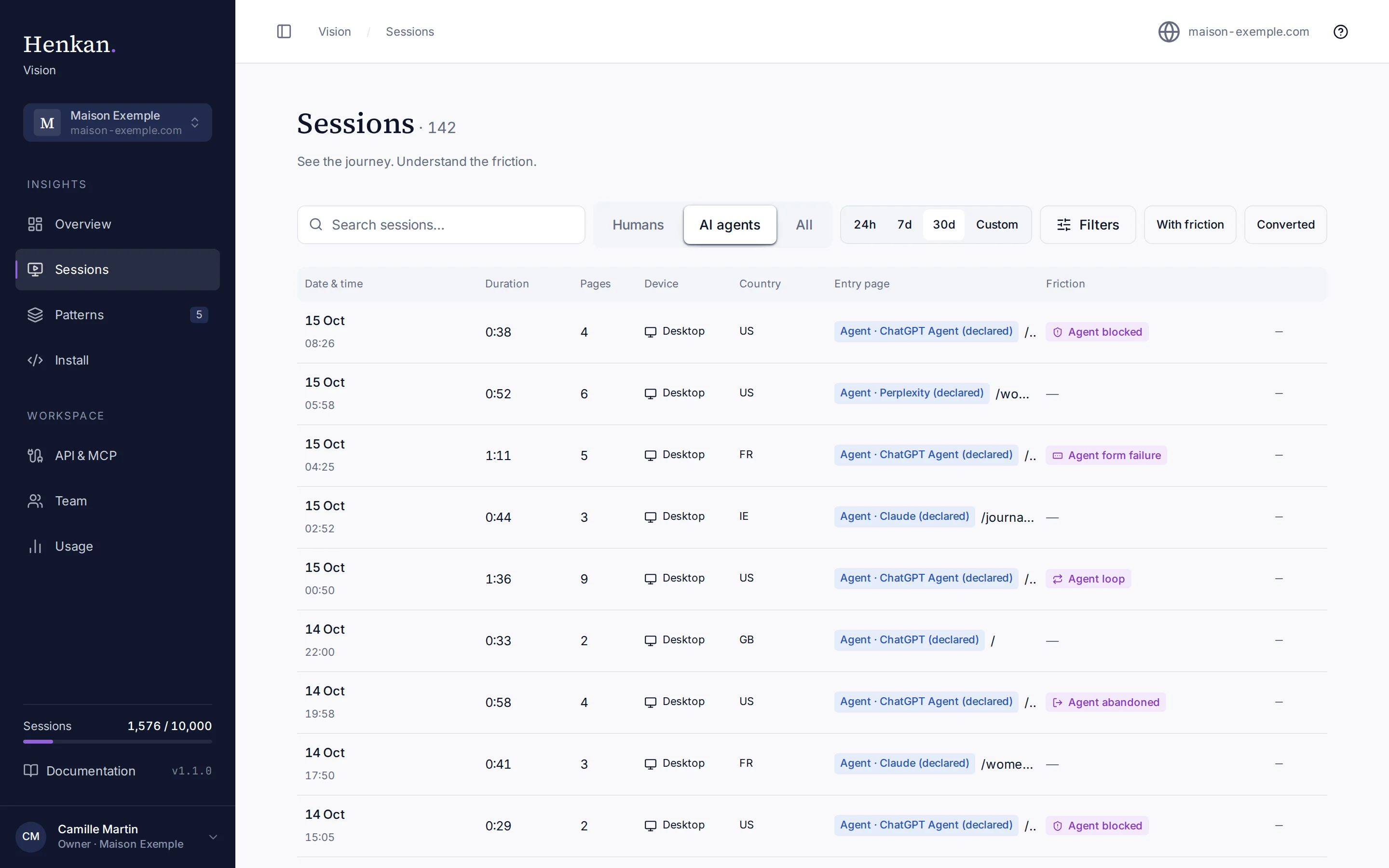
- Open Sessions Select Sessions in the sidebar.
- Switch to AI agents Select AI agents in the visitor type switch. Select All to see humans and agents together.
- Filter agent friction In Filters, the Friction tag list now includes the agent tags.
Overview shows a separate AI agents block with Agent sessions, Agent friction rate and Top agents, and Patterns has an AI agents view.
Agent friction tags#
| Tag | When it is added |
|---|---|
| Agent loop | The agent repeated the same action on the same element 3 times or more without a page change. |
| Agent blocked | The agent reached a captcha, consent or sign-in wall and the session ended within 30 seconds. |
| Agent form failure | A form showed a validation error, or was submitted with no page change in the next 5 seconds. Added once per page. |
| Agent abandoned | The session ended on a funnel page (cart, checkout, sign-up, contact, booking, quote…) after 5 or more actions, without converting. |
Monthly agent cap#
AI agent sessions do not use your monthly quota. They have their own safety cap of 2,000 agent sessions per month per organisation. After the cap, agent sessions are ignored until the month resets and appear under AI agents over cap in the ignored figures. See Usage and limits.
AI crawlers#
The AI crawlers block on Overview shows the total number of crawler visits in the month and the three most active vendors. With AI agents selected on Sessions, the crawler visits for the selected period appear below the list. Vision recognises crawlers from their published user agents and stores only the vendor, the day and a count: no user agent string and no recording.